The News: Microsoft Windows 11 has finally, and officially, been confirmed by Microsoft, with the company promising availability as a free upgrade to Microsoft 10 users first, and available in the wild sometime in October, with new hardware running the OS. The focus for Windows 11 is all about simplification of the user experience, focused on ease, productivity, and creativity. “With Windows 11, we have a renewed sense of Windows’ role in the world,” said Microsoft CEO Satya Nadella, during the announcement today. “Today, the world needs a more open platform, one that allows apps to become bigger in their own right. Windows is a platform where things that are bigger than Windows can be born, like the web.” Read the announcement from Microsoft here.
Microsoft Windows 11 — Focused on Ease, Productivity, and Creativity
Analyst Take: News of the Microsoft Windows 11 release hasn’t come as a complete surprise — at least not to anyone paying attention, as screenshots of the Windows 11 operating system were leaked online last week on Baidu. Surprise factor notwithstanding, the changes in the Windows 11 OS seem to be centered on making a better user experience with simplicity and ease of use front and center as well as being the OS for hybrid work — and everybody wins on that front.
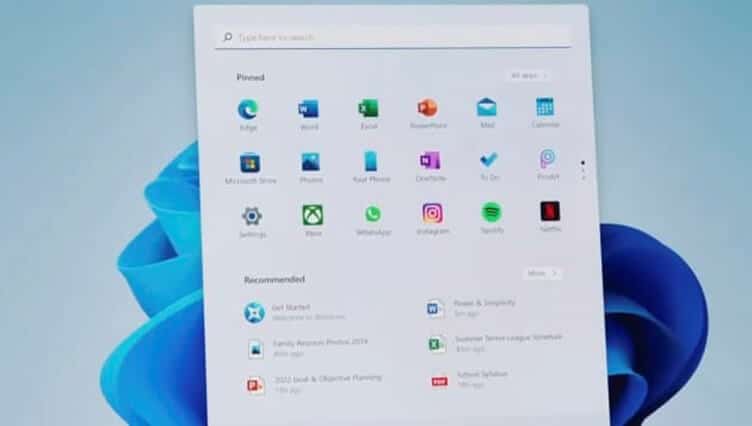
For starters, the aesthetics. Microsoft Windows 11 features rounded corners and a simplified Start menu that appears in the center of the screen. There are apps, a separate search function, the ability to quickly shut down, restart, and find recent files. There’s also the option to personalize a user experience, offering dark mode capabilities, along with, I believe, the ability to move apps and the Start menu from the center to the side if preferred.
The design of Microsoft Windows 11 appears to take into consideration the many users using multiple monitors (and who doesn’t these days?). It includes nods to productivity like apps opening on the screen that users want them to open on, a Snap Layouts feature for ease of use of those apps, Snap Groups, that will actually remember where you stored those apps and which ones you were most recently using, along with an AI-powered, personalized widgets feed. Here’s a look at the widgets:
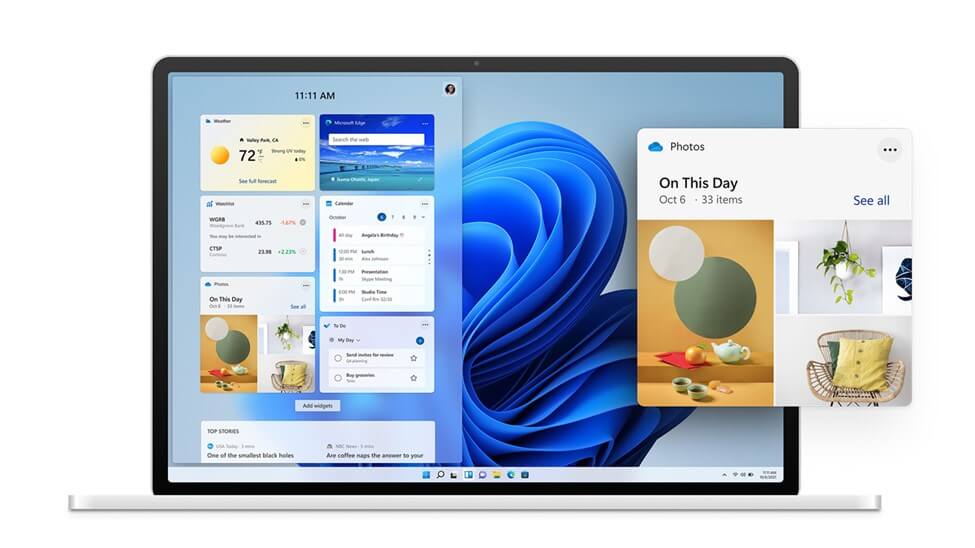
Personalized Productivity and Ease of Use
I’ve already mentioned Snap Layouts and Groups, along with Widgets that are designed to offer personalized experiences. Even more exciting, to me anyway, is the incorporation of the Microsoft Teams app into Windows by way of the Taskbar, as you can see in the image below. Teams is being updated to make it work more like a systemwide messaging app, facilitating chat in standalone windows and making it easy to jump into a video call with ease. This makes access to functionality that people use all day every day even more seamless, and it also makes Teams a more foundational part of the communication and collaboration experience — which I’m sure is the point. Making teams easily available in the toolbar, which you can see in the image below, facilitates frequent use.

For folks using a stylus or working without a keyboard, the virtual keyboard has been redesigned and haptic feedback will be incorporated, with a view toward making those experiences exponentially better.
Microsoft Windows 11 Will Run Android Apps (and not gouge developers)
Some big news here is that for the first time, Windows 11 will include support for Android apps, which can be accessed from the task bar. Apps will be downloadable from Amazon’s Appstore by way of the new Windows store, which is a part of the new OS. This is exciting for Windows users and offers a variety of apps that haven’t before been available — including Instagram, TikTok, Disney+, Zoom, Canva, Adobe Creative Cloud, and Visual Studio. And in a major nod to creators, unlike other app stores (ahem, Apple), Microsoft won’t take a cut from developers using their own commerce engines and payment systems (unless it’s a game). For devs who want to use Microsoft’s commerce, the rev share is 85/15 (much easier to live with than, well, you know). Microsoft is partnering with Intel and using its Intel Bridge tech to make this happen but says the Android apps will still work with both Arm and AMD-based systems.
The app ecosystem, or lack thereof, has long been an issue, and I’m glad to see Microsoft’s progress on this front and the native integration of Android apps directly into Windows.
Improved Performance
Last but not least, the improvements to Microsoft Windows 11 are all about improved performance. Microsoft claims that users of Microsoft’s Edge browser should see longer battery life, that system updates will be less frequent (one per year versus two), and updates are expected to be 40% smaller.
For gamers, Windows 11 boasts amazing speed, superior graphics, and a huge selection of games. There’s Auto HDR, which automatically adds High Dynamic Range (HDR) enhancements to games built on DirectX 11 or higher. HDR will allow a game to render a broader range of colors and brightness values, giving more depth and richness to images. Offering a high performance NVMe SSD and new tech called DirectStorage (which will only be available on Windows 11), games will load faster and not bog down the CPU. And of course with the Xbox Game Pass for PC or Ultimate, gamers will get access to a nice library of games, and the ability to easily find people to play with. My kids will be very excited about these upgrades.
Microsoft Windows 11 — Wrapping Up
In sum, it’s clear that the Microsoft Windows 11 is focused on ease, facilitating productivity, and creativity — all things Satya Nadella and the team at Microsoft have been passionately vocal about.
Note that if you’re excited about the release of Microsoft Windows 11, that you will have to have the right hardware to run the new OS. Users will need to buy Windows 11-ready PCs and/or check their PC using Microsoft’s PC Health Check app to see if their PCs are eligible to upgrade free of charge. As I mentioned earlier, the update will start to roll out free to existing Microsoft 10 users by the 2021 holiday season and Microsoft said that companies will begin selling Windows 11-ready PCs before launch. If you want to test out Windows 11 early, a beta version will be available next week for those in the Windows Insider Program, and it’s expected that a public beta will be released in July. Note that its recommended to only install a beta on your secondary device, because bugs are …. always inevitable.
Disclosure: Futurum Research is a research and advisory firm that engages or has engaged in research, analysis, and advisory services with many technology companies, including those mentioned in this article. The author does not hold any equity positions with any company mentioned in this article.
Other insights from Futurum Research:
Microsoft’s Rebranded Azure Virtual Desktop: The Future Of Work Is Hybrid
Microsoft Build Updates: Power Platform, Power FX, And Azure Synapse Link
Image Credit: Microsoft
Author Information

Shelly Kramer is a serial entrepreneur with a technology-centric focus. She has worked alongside some of the world’s largest brands to embrace disruption and spur innovation, understand and address the realities of the connected customer, and help navigate the process of digital transformation.