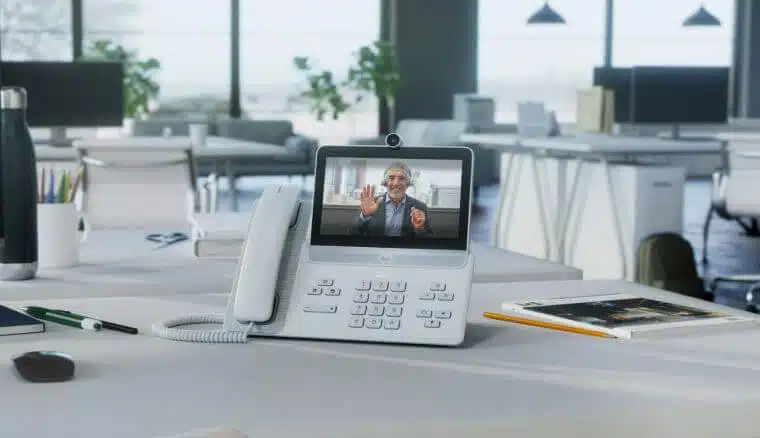
The News: Cisco announced the Cisco Video Phone 8875 for Webex at its recent Cisco Live! event, a new addition to Cisco’s 8800 series. Cisco’s Video Phone 8875 Series is intended to be a hybrid work solution, creating seamless hybrid work experiences across the board and also simplifying life and reducing costs for IT teams. Read the full blog post from Cisco here.
Cisco Video Phone 8875 for Webex, Designed for Hybrid Workers and Making IT Teams Happy in the Process
Analyst Take: The Cisco Video Phone 8875 for Webex is Cisco’s latest addition to its 8800 series video phone lineup. The Cisco Video Phone 8875 was designed specifically for hybrid work and aims to enhance collaboration experiences with enterprise-grade calling capabilities, bringing together Webex Cloud Calling and Cisco IP phones. Equally as important, the 8875 system has clearly been designed with easing the burden for IT teams in mind as well — and that makes it a win all the way around.
Cisco Video Phone 8875 Specs
The Cisco Video Phone 8875 features include a 7-inch touchscreen monitor with 1024×600 resolution and an 85-degree viewing angle along with color depth of 16.7M colors. The camera has a 12-megapixel image sensor with auto framing (face detection) coupled with a 72-degree horizontal field-of-view and a 45-degree vertical field-of-view. Background noise removal optimizes for each user’s voice, and the 1080 pixel camera pivots easily, has an auto focus feature, and can be completely shut off if so desired.
Calling features include caller ID, call waiting, music-on-hold (MoH), call forwarding, do not disturb, shared lines, transfer options, speed dial and more. One feature I think will resonate with organizations embracing hybrid work, especially if they’re shifting to hot desking, is the one button to push (OBTP) feature, which allows the user to see their personalized calendar and other settings when they are at the Cisco Video Phone 8875, a massive boon to productivity.
Another feature of the Cisco Video Phone 8875 designed to speak to hot desking is the ability for users to reserve the phone for a specific period of time, easily accessed by scanning a QR code from their mobile device. Users can also join meetings with one button by way of an integration with the Webex calendar. Even better, the secure authentication functionality baked in is, to our way of thinking, incredibly important.
The 8875 offers up pretty sweet ease of use, with an intuitive touchscreen and a dial pad that all users will instantly be familiar with. The interface pairs with the Webex app on desktop and mobile devices, and contact lists and call history are easily accessible.
Why Organizations Need a Desk-Based Phone
What we like most about the Cisco Video Phone 8875 is that Cisco clearly recognizes the need for scalable, affordable hybrid work solutions. There isn’t a one size fits all model when it comes to the hybrid work environment and myriad solutions are often needed. Some employees will continue to work remotely, while others will be moving back-and-forth to the office. Whether they’re working or collaborating in a large conference room, a huddle room, hot desking or wherever, this is a solution that checks all the right boxes.
Although the Cisco Video Phone 8875 is targeted toward hybrid environments where hot desking is becoming the norm, we see the phone landing in myriad areas. Think scenarios where organizations want key personnel regularly onsite, such as senior executives with support staff that are in constant meetings throughout the day (e.g., managing customers and internal personnel). Another example would be in situations where a user needs all their compute resources dedicated to a specific task but also need to collaborate with remote teams on projects while staying at their desk, like data mining professionals writing myriad lines of code and querying the SQL database coupled with analyzing data, which sucks up a significant amount of compute resources. We see the ability to offload the collaboration piece to the Cisco Video Phone 8875 as an easy solution and one that would be heartily welcomed in those situations. Another area where having a desk-based phone versus a laptop/browser or app-based experience is situations where the system could be impacted by a virus, an unplanned system update, or even a random need to reboot getting in the way of collaboration and scheduled meetings. Separating laptop from video collaboration will be, for many users, a very welcomed improvement.
Why IT Teams Will Love the Cisco Video Phone 8875
And it’s not just users who we think will like the 8875. IT teams today have very full plates and long to-do lists — and we think they’ll be fans of the Cisco Video Phone 8875, too. Not only has Cisco made onboarding incredibly fast and easy, with activation codes sent to users’ email addresses, but equally as important is the management, serviceability, and maintenance of the system, which has also been designed to be super simple. For identification and resolution of problems, IT teams can use the Control Hub, which provides visibility for the entire system and, as a bonus, the 8875 is Wi-Fi enabled, which means deployments can be flexible and easily scalable. Add to that the cost-reduction that these features can deliver, it’s exactly what’s needed in today’s fast-paced business world.
Dedicated, Always Ready, Simple to Use, Simple to Scale, Secure, and Affordable – Sign Us Up!
Wrapping it up, what’s not to like about a dedicated, always ready, simple to use, simple to scale, secure, and affordable enterprise-grade collaboration solution — and one designed with hybrid workers, ease of use and management by IT teams, and the reality of the hybrid workplace in mind? To our way of thinking, there’s nothing not to like. The Cisco 8875 Video Phone is a smart addition to the Webex devices portfolio, and we look forward to checking it out.
Disclosure: Futurum Research is a research and advisory firm that engages or has engaged in research, analysis, and advisory services with many technology companies, including those mentioned in this article. The author does not hold any equity positions with any company mentioned in this article.
Analysis and opinions expressed herein are specific to the analyst individually and data and other information that might have been provided for validation, not those of Futurum Research as a whole.
Other insights from Futurum Research:
Image Credit: TechSpective
Author Information

Shelly Kramer is a serial entrepreneur with a technology-centric focus. She has worked alongside some of the world’s largest brands to embrace disruption and spur innovation, understand and address the realities of the connected customer, and help navigate the process of digital transformation.